I-Balance Leg HoldPose Reference
Camera angles
The I balance pose stands the wooden figure on one straight leg while the other leg rises vertically beside the head, held by the hand at the ankle.
Tags: standingbalanceleg holdflexibilityfull body
How to draw the I-Balance Leg Hold pose
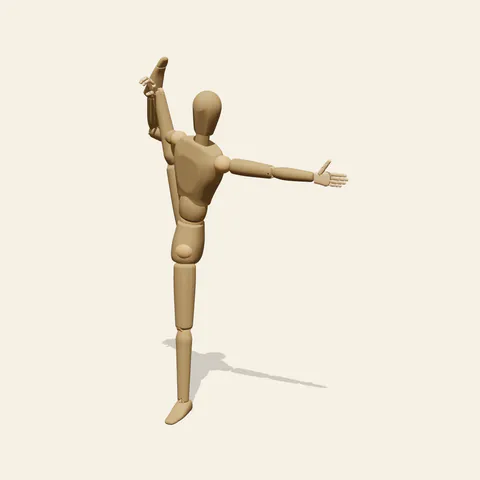
three-quarter view 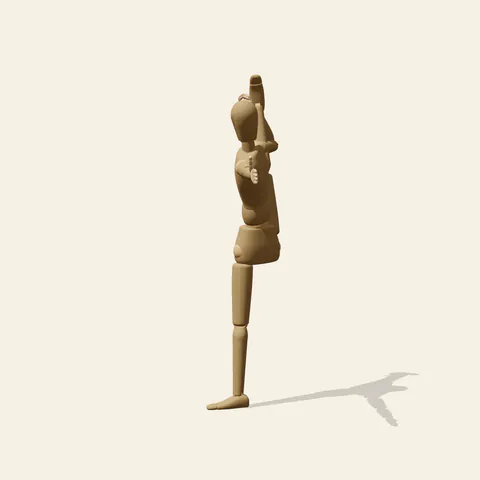
side view 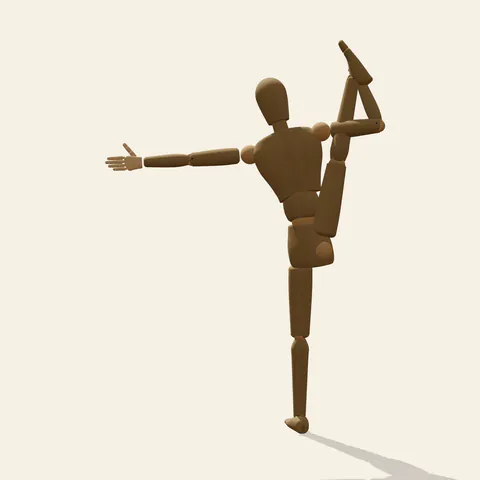
back view 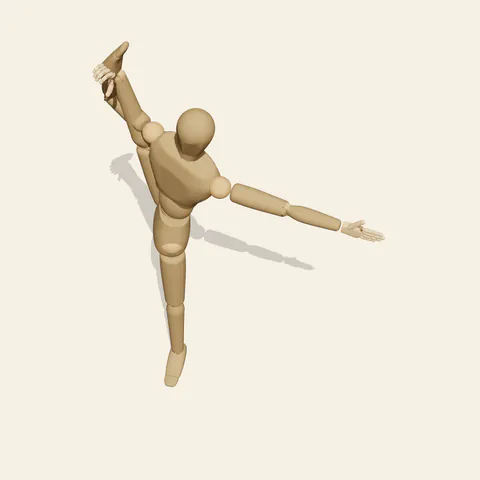
high-angle view
The left leg carries all of the weight, knee locked and foot flat, with the pelvis stacked almost directly above that ankle. The right leg travels straight up past the ear, so thigh, shin and pointed foot form one tall column beside the head. The right hand closes around the ankle near the top of that column, and the right arm runs parallel to the leg instead of reaching across the body. The left arm extends level to the side as a counterweight. A slight lean of the torso away from the lifted leg keeps the centre of mass, about 116 cm up, over the support foot. Standing leg and raised leg read as one vertical stroke, interrupted only by the hips.
Front and back views show the full extension: the raised leg pressed close to the side of the head and the horizontal arm crossing the whole silhouette. From the side view, taken from the figure's left, the lifted leg hides almost entirely behind the torso and head, leaving a narrow upright shape that tests whether you understand the overlap. The high angle foreshortens the standing leg and makes the outstretched arm the longest line on the page, while the low angle exaggerates how high the raised foot sits above the head. Draw the pelvis as a tilted box; the lifted side rotates open and the standing side settles slightly lower.
More on angles and common mistakes
Typical errors are a softened standing knee, a raised leg that drifts in front of the face like a front kick, and a hand attached mid-shin instead of at the ankle. Keep the gap between ear and inner knee small, because a wide gap turns the shape into a high side kick. The mannequin has no hair, so any imagined ponytail should fall behind the lifted leg rather than through it.
Dancers, gymnasts, figure-skating spiral studies and character sheets that need to show extreme flexibility all benefit from this reference. In Edit this pose, rotate the left arm down to the hip to see how much the balance relies on that sideways reach, or lower the raised leg by twenty degrees for a warm-up version that is less extreme.
Free to use (CC0). The pose images on this page are released under CC0 1.0 (public domain dedication). Use them for drawing practice, commercial illustration, reference sheets or AI image generation; no attribution is required. A credit to PoseMaker is appreciated but optional.
I-Balance Leg Hold pose prompt
Copy a prompt for your AI image generator. Pair it with the OpenPose skeleton in ControlNet so the generated character matches this exact pose.
General prompt
A dancer balancing on a straight left leg, the right leg lifted vertically beside the head and held at the ankle with the right hand, the left arm extended level to the side, torso tall with a slight lean away from the raised leg, gaze forward, full body on a plain background.
Midjourney
full body dancer in an I balance, standing on straight left leg, right leg raised vertically beside head, right hand holding ankle, left arm extended sideways, tall torso, pointed foot, calm focus, plain studio background --ar 2:3 --style raw
Stable Diffusion
1person, full body, standing, i balance, standing on one leg, leg raised vertically, leg beside head, holding ankle, straight standing leg, arm extended to side, pointed toes, flexibility, dance pose, balance, athletic, front view, plain background, clear joints
Negative prompt
bent standing knee, raised leg in front of face, hand on shin, both feet on ground, leg behind back, extra legs, missing arm, twisted hip, fused fingers, distorted ankle, cropped foot, nsfw, blurry
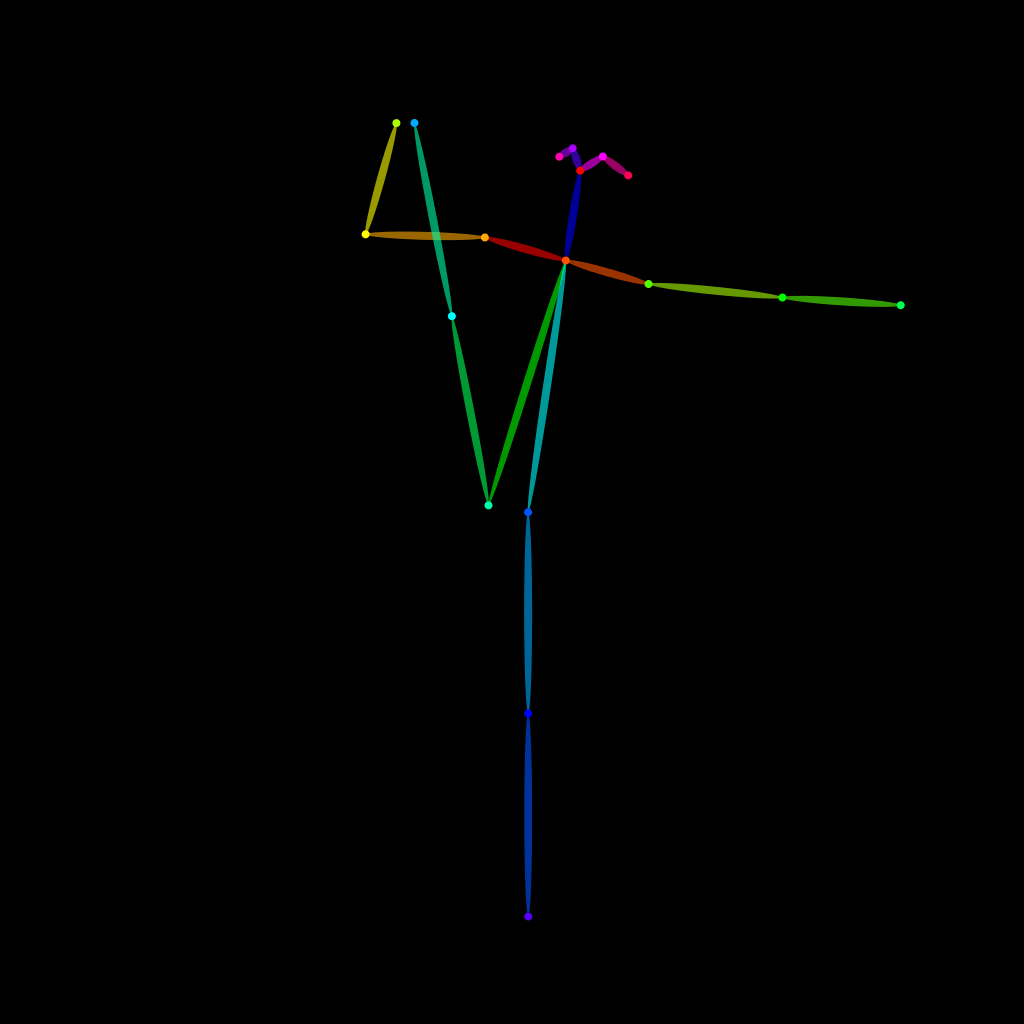
OpenPose skeleton for ControlNet
Load the PNG into a ControlNet OpenPose unit (preprocessor: none), or import the JSON into an OpenPose editor.
Have a photo of the pose you want?
Upload it to Photo to Pose. We detect the pose in your browser and put it on the mannequin, ready to adjust.