W-Sit, Hand on NeckPose Reference
Camera angles
W-Sit, Hand on Neck lowers the figure between its folded shins, one palm curled around the nape and the other hand resting on a knee.
Tags: sittingfigure drawingfull bodyw sittinghand on neck
How to draw the W-Sit, Hand on Neck pose
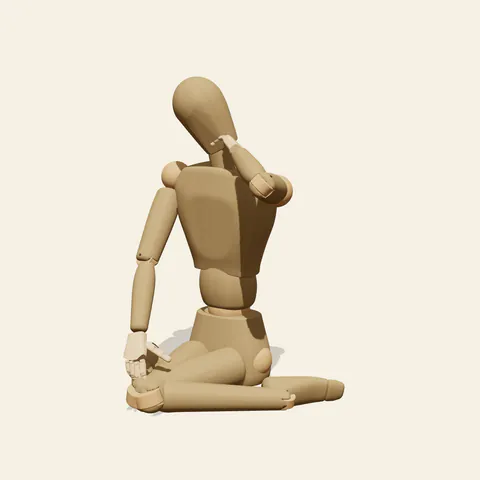
three-quarter view 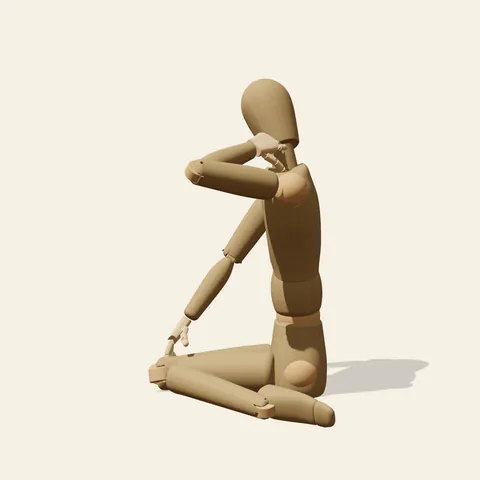
side view 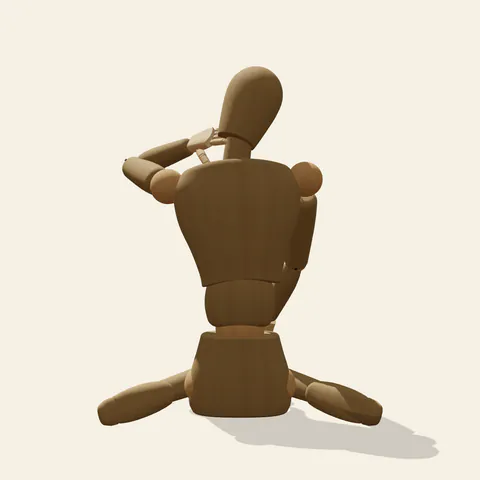
back view 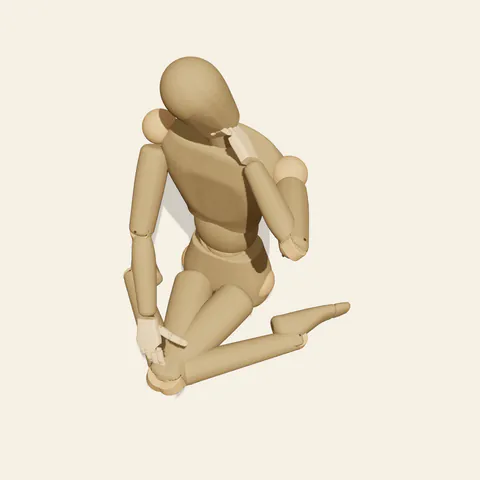
high-angle view
The seat is the floor itself: the pelvis drops into the gap between the heels, the thighs point forward with the knees almost touching, and each shin angles back and outward with the top of the foot down. Above that wide base the torso stays vertical and calm rather than arching. All the asymmetry lives in the arms and head. The figure's left arm folds tightly, upper arm lifted ahead of the shoulder and forearm doubling back so the hand wraps the side and back of the neck, the elbow jutting forward past the cheek. The right arm drops down the front of the body until its hand settles on the right shin just below the knee. The head bows and turns a little toward that lower hand, as if easing a stiff neck.
The six angles divide the work. From the front, the thighs hide most of the shins and the raised elbow crosses the face, so you have to find the skull around it. The side view, taken from the figure's left, explains the arm best: elbow ahead of the chin, forearm vanishing behind the jaw. Turn to the back or the high angle to see the actual W, two shins fanning out from the seat, and to locate the fingers on the nape. The low angle makes the knees loom and stacks the elbow against the head contour.
More on angles and common mistakes
Three slips change the gesture. Putting the palm on the crown reads as a different, more dramatic action; swinging the elbow straight out sideways turns it into a stretch; lifting the pelvis onto the heels converts the W into a kneel. The wooden shoulder barely rises, so add a slight shrug on a living model. No hair is modelled, and imagined hair would spill over the fingers at the back.
This w sitting hand on neck variant suits weary or reflective moments: a student easing tension after hours over a sketchbook, a dancer resting backstage, a quiet slice-of-life panel. Open Edit this pose, lower the raised elbow by a few degrees and lift the head to face forward; the mood shifts from tired to shy. The floor is not shown, so draw a mat or boards under the shins.
Free to use (CC0). The pose images on this page are released under CC0 1.0 (public domain dedication). Use them for drawing practice, commercial illustration, reference sheets or AI image generation; no attribution is required. A credit to PoseMaker is appreciated but optional.
W-Sit, Hand on Neck pose prompt
Copy a prompt for your AI image generator. Pair it with the OpenPose skeleton in ControlNet so the generated character matches this exact pose.
General prompt
A person sits on the floor in a W position, knees together in front and shins folded back and out to both sides. The torso is upright; one hand cups the back of the neck with the elbow pointing forward, the other rests on a knee, and the head bows slightly. Plain background.
Midjourney
full body person w-sitting on the floor, knees together, shins splayed out to both sides, upright torso, one hand holding the back of the neck, elbow forward, other hand resting on knee, head bowed, tired thoughtful mood, plain background --ar 2:3 --style raw
Stable Diffusion
1person, full body, w sitting, sitting on floor, knees together, legs folded outward, hand on neck, hand behind neck, elbow forward, hand on knee, one arm raised, head down, looking down, upright posture, tired, three quarter view, plain background
Negative prompt
hand on top of head, both hands behind head, elbow out to side, sitting on heels, kneeling, cross-legged, knees apart, looking up, leaning back, extra arms, extra fingers, fused hand, bad anatomy, cropped feet
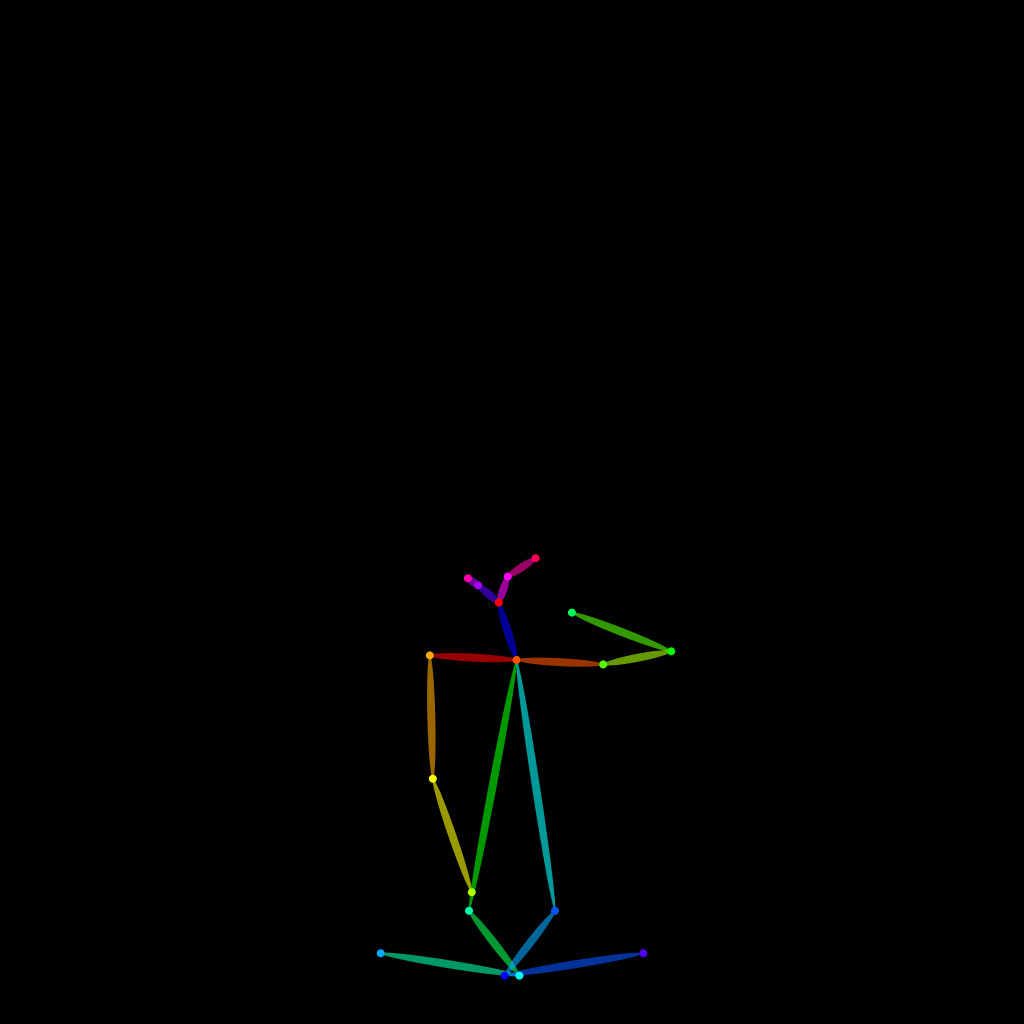
OpenPose skeleton for ControlNet
Load the PNG into a ControlNet OpenPose unit (preprocessor: none), or import the JSON into an OpenPose editor.
Have a photo of the pose you want?
Upload it to Photo to Pose. We detect the pose in your browser and put it on the mannequin, ready to adjust.