Braced Arm, Knee RestPose Reference
Camera angles
Braced Arm, Knee Rest seats the figure with legs stretched forward, one straight arm propped behind the hip and the other hand laid on the far knee.
Tags: sittingfigure drawingfull bodypropped on one armhand on knee
How to draw the Braced Arm, Knee Rest pose
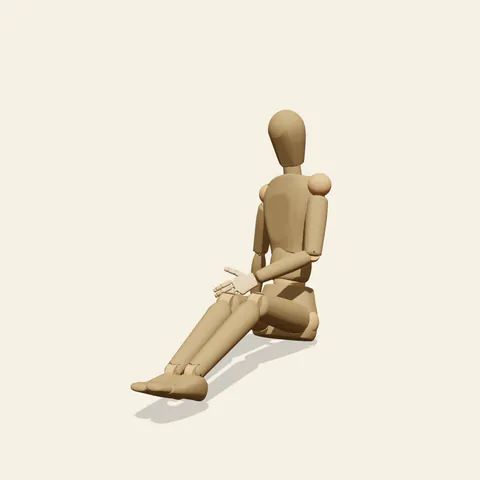
three-quarter view 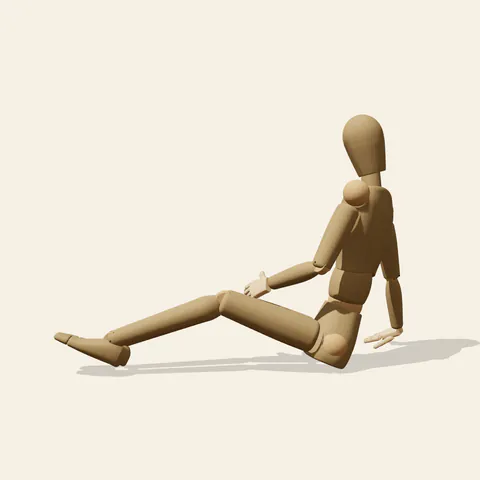
side view 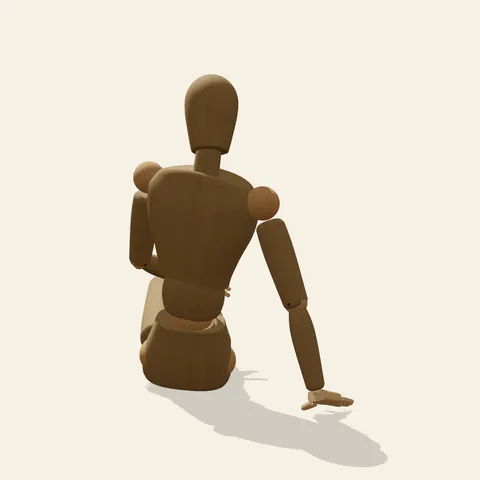
back view 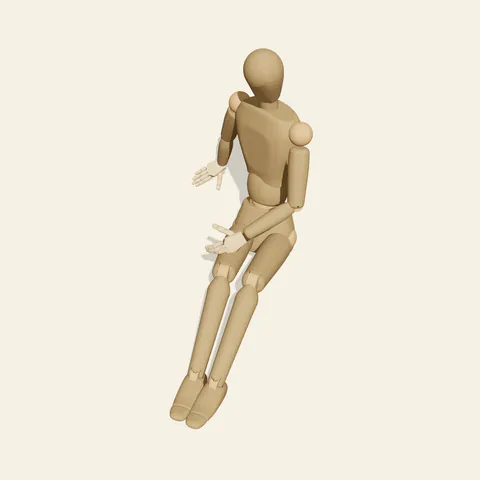
high-angle view
Both legs run out in front, close together, the knees only softly bent so the heels stay on the floor and the soles tilt up. The pelvis rolls back a touch and the torso reclines onto the figure's right arm, which is locked straight and planted behind and beside the right hip, wrist bent back so the open palm lies flat. That arm carries a real share of the weight and becomes a strut from shoulder to floor. The left arm crosses the body diagonally and rests its hand on the right knee. Because both hands pull to the same side, the shoulders swing toward the bracing arm while the head tips the opposite way, giving a relaxed counter-tilt at the top of the figure.
As a sitting arm braced behind hand on knee study, it rewards tracing three triangles: legs and floor, bracing arm and floor, and the loop of the crossing arm against the chest. The side view from the figure's left lays out the long diagonal of the legs and the recline of the back; the bracing arm shows only as a strut behind. The back view is where that arm reads clearly, angled out and down to its flat palm. From the front, the legs foreshorten sharply and the knees overlap the pelvis, so measure the shin lengths rather than guessing. The high angle explains how far the support hand sits from the hip.
More on angles and common mistakes
Watch the elbow of the bracing arm: if you bend it, the torso has nothing to lean on and the figure looks as if it is falling. Another frequent error is drawing the crossing hand on the near knee, which cancels the shoulder turn. Keep the heels touching the ground; lifted feet would make it a V-sit. The wooden mannequin shows a hard joint at the wrist, while a real palm would spread and whiten under load.
The arrangement fits picnics, beach afternoons, a character listening on a lawn or resting after a hike. In Edit this pose, bend both knees further until the soles lie flat and you get a more compact, casual seat with the same lean. The ground is not shown, so a blanket or sand can be added freely.
Free to use (CC0). The pose images on this page are released under CC0 1.0 (public domain dedication). Use them for drawing practice, commercial illustration, reference sheets or AI image generation; no attribution is required. A credit to PoseMaker is appreciated but optional.
Braced Arm, Knee Rest pose prompt
Copy a prompt for your AI image generator. Pair it with the OpenPose skeleton in ControlNet so the generated character matches this exact pose.
General prompt
A person sits on the floor with both legs stretched forward together, knees softly bent and heels down. One straight arm is braced on the floor behind the hip, the other hand reaches across to rest on the far knee; shoulders turn toward the support arm and the head tilts the other way. Plain background.
Midjourney
full body person sitting on the floor, legs extended forward together, knees slightly bent, one straight arm braced behind the hip, other hand resting on the far knee, gentle recline, head tilted away, relaxed afternoon mood, plain background --ar 3:2 --style raw
Stable Diffusion
1person, full body, sitting, sitting on floor, legs forward, knees slightly bent, heels on floor, arm support, hand on floor, leaning back, hand on knee, reaching across body, head tilt, relaxed, side view, plain background
Negative prompt
bent support arm, hand on near knee, both hands on floor, feet lifted, v-sit, cross-legged, lying down, knees up to chest, floating hand, extra arms, extra fingers, bad anatomy, cropped feet, chair
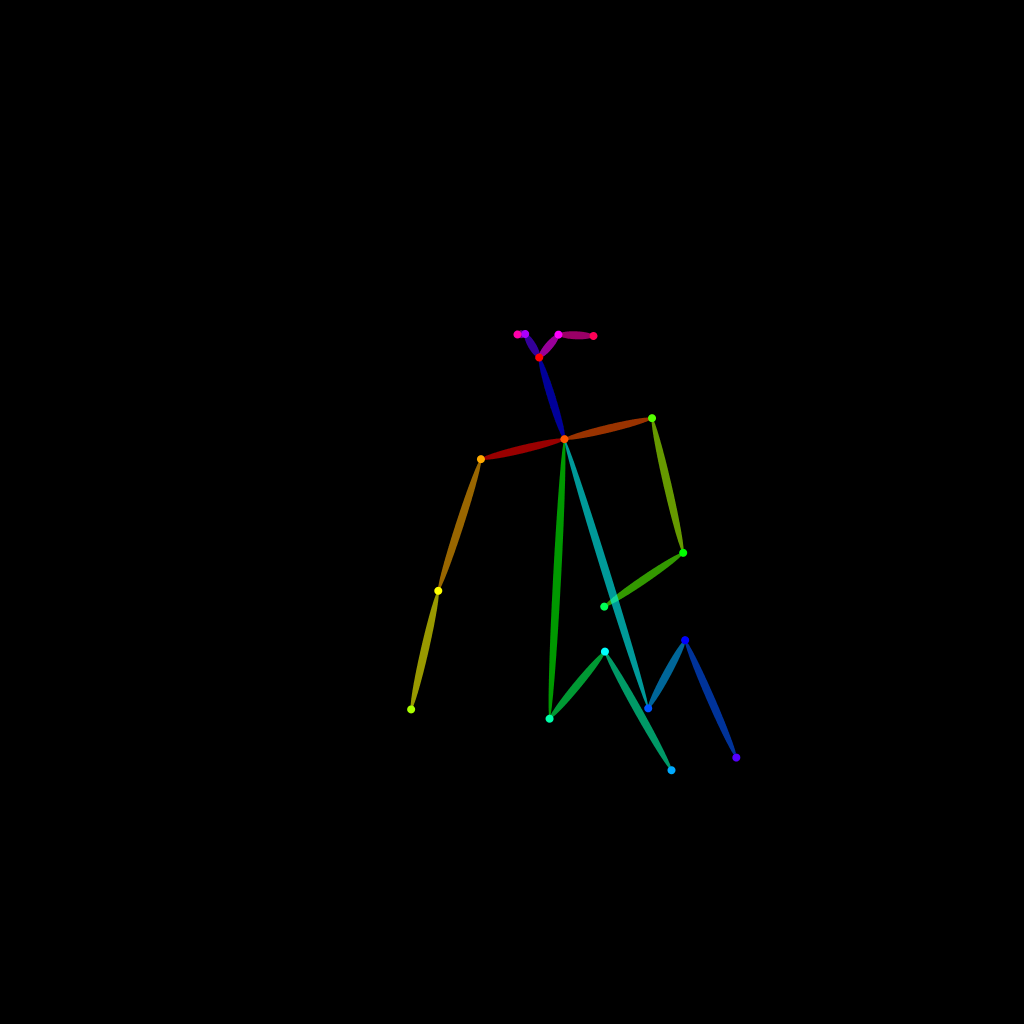
OpenPose skeleton for ControlNet
Load the PNG into a ControlNet OpenPose unit (preprocessor: none), or import the JSON into an OpenPose editor.
Have a photo of the pose you want?
Upload it to Photo to Pose. We detect the pose in your browser and put it on the mannequin, ready to adjust.