Crouch, Hand on FloorPose Reference
Camera angles
Crouch, Hand on Floor: a crouching hand on floor pose, low on the balls of the feet, right fingertips touching down outside the foot, face tipped up.
Tags: crouchingsquattinghand on floorlooking upfull body
How to draw the Crouch, Hand on Floor pose
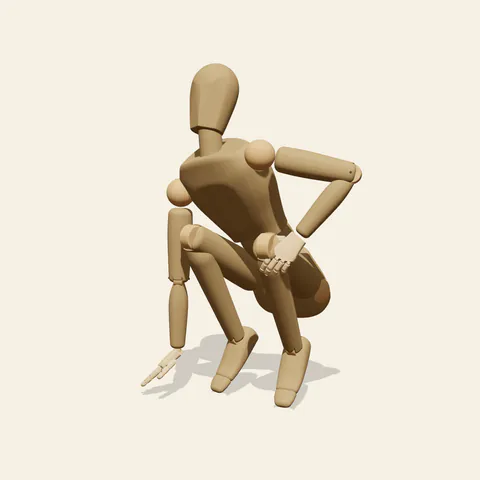
three-quarter view 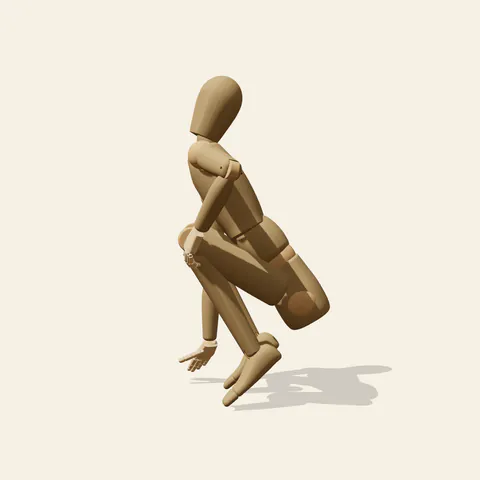
side view 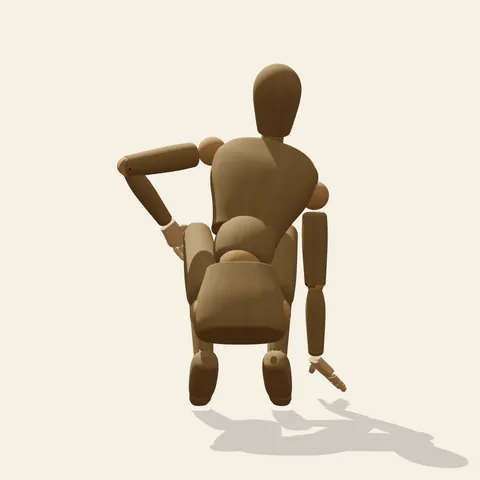
back view 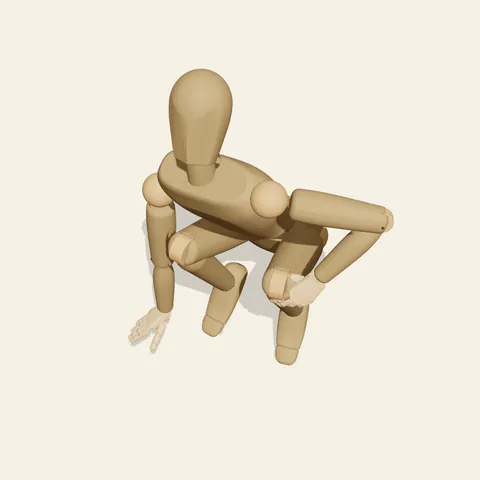
high-angle view
The base is narrow. Both heels are off the ground, so the figure balances on the balls of the feet with the knees driven forward and nearly touching, and the hips sink behind and below them. The chest leans slightly forward and toward the right, bringing the right shoulder down over the hand. That right arm hangs straight from the shoulder and the fingertips meet the floor just ahead of and outside the right foot, a light third point of contact rather than a load-bearing post. The left hand drapes over the left knee with the elbow winging out, and the head tilts back so the face turns upward, as if something overhead has caught the figure's attention.
Treat the silhouette as a tight wedge with one long vertical spoke. In the front view the straight right arm and the folded legs run side by side, and the sliver of space between them keeps the arm readable; close it and the hand merges into the shin. The profile from the figure's left shows how far the seat sits behind the heels and how the head tilts up above a forward-leaning trunk, two opposing directions that give the crouch its tension. The back view exposes the right arm reaching down past the hip. From the high angle the upturned face, shoulders and knees overlap heavily, so construct the figure from the front or three-quarter view first.
More on angles and common mistakes
Planting the whole right palm and leaning on it changes the balance into a sprint start; here the fingertips barely press. Dropping the heels makes the crouch look like a resting squat, and spreading the knees wide loses the compact, coiled shape. Keep the left elbow out too: tucked against the ribs it disappears into the torso and the contrast between the two arms is gone.
The pose works for a scout reading tracks, a character steadying before a leap, someone hearing a noise above them in a thriller panel, or a dancer setting up a floor move. Ground texture, footprints or an imagined clue under the fingertips are yours to add. In Edit this pose, drop the head forward to look at the hand instead of up, and the same body reads as inspecting the ground rather than reacting to something above.
Free to use (CC0). The pose images on this page are released under CC0 1.0 (public domain dedication). Use them for drawing practice, commercial illustration, reference sheets or AI image generation; no attribution is required. A credit to PoseMaker is appreciated but optional.
Crouch, Hand on Floor pose prompt
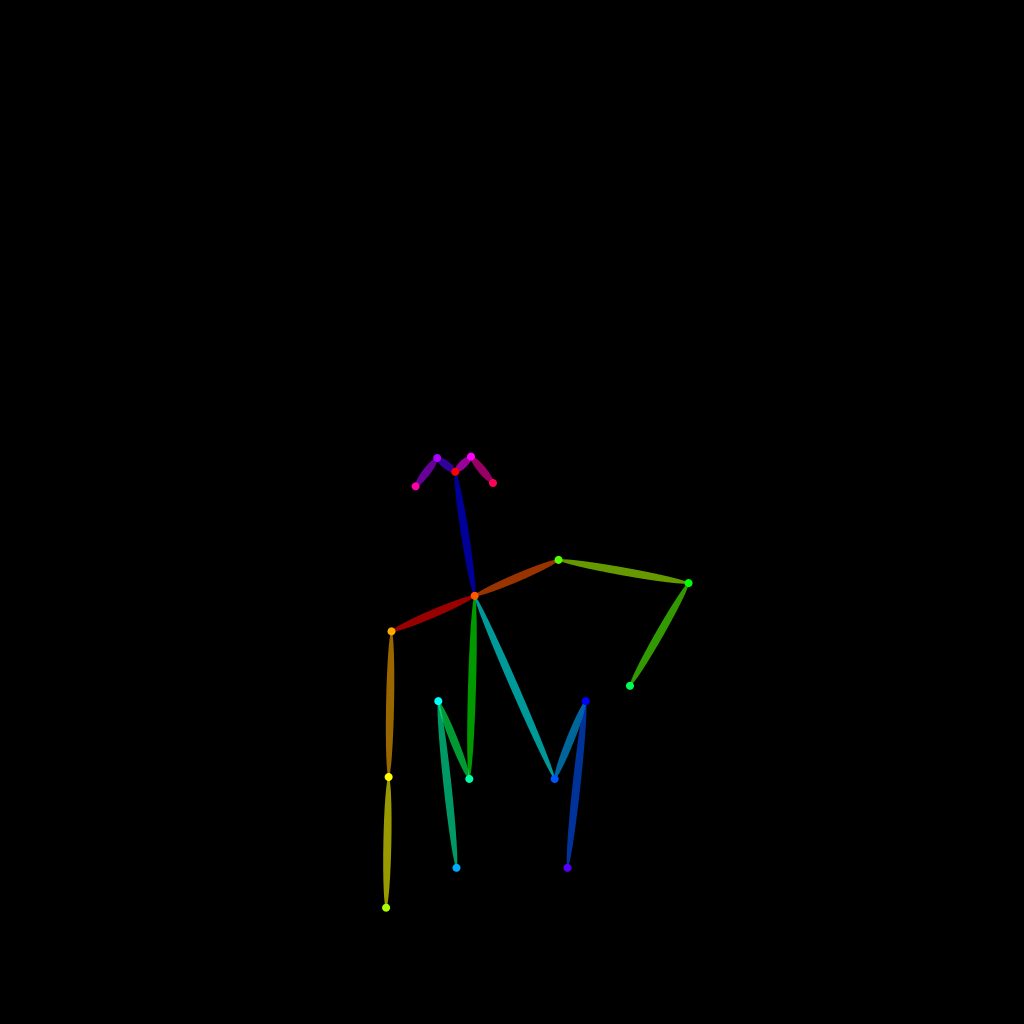
Copy a prompt for your AI image generator. Pair it with the OpenPose skeleton in ControlNet so the generated character matches this exact pose.
General prompt
A person in a deep crouch on the balls of the feet, knees forward and close together, chest leaning slightly forward and to the right, right arm reaching straight down so the fingertips touch the floor beside the right foot, left hand on the left knee, head tipped back looking up, plain background.
Midjourney
full body person crouching low on the balls of the feet, knees together, one straight arm reaching down with fingertips on the floor, other hand resting on knee, elbow out, head tilted back looking up, alert mood, plain background --ar 2:3 --style raw
Stable Diffusion
1person, full body, crouching, squatting, on toes, heels up, knees together, hand on floor, fingertips on ground, straight arm, hand on knee, elbow out, leaning forward, head back, looking up, alert, front view, simple background
Negative prompt
palm flat on floor bearing weight, heels on ground, knees spread wide, sitting on floor, kneeling, looking down, both hands on floor, standing, extra arms, malformed hands, missing fingers, bad anatomy, cropped feet, blurry
OpenPose skeleton for ControlNet
Load the PNG into a ControlNet OpenPose unit (preprocessor: none), or import the JSON into an OpenPose editor.
Have a photo of the pose you want?
Upload it to Photo to Pose. We detect the pose in your browser and put it on the mannequin, ready to adjust.