3D drawing reference
Thumbs Up Reference
Use this thumbs up reference to study the raised thumb and folded fingers, then rotate and pose the hand yourself.
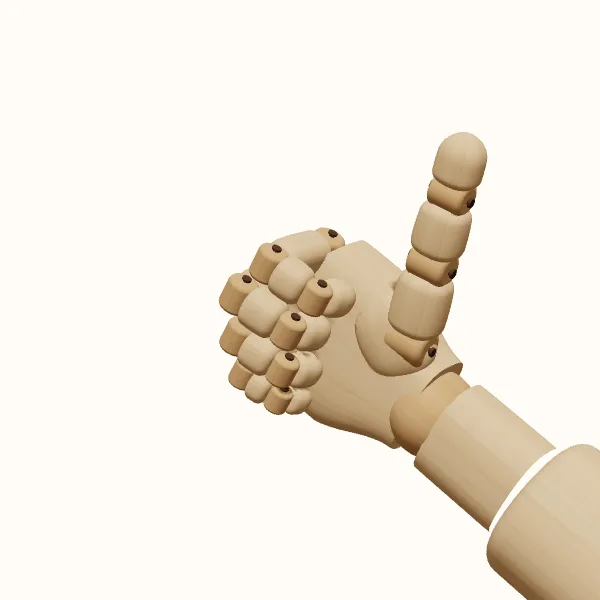
Rotate the view, adjust the fingers, then export your reference.
Start with the preset above. Your edits stay in the tool; the study images below show the original pose.
Thumbs up: three models to study
Compare the simplified wooden form with the female and male hand models. Choose a model to use it in the editor without resetting your finger adjustments.
Build a compact base from the palm and folded fingers
Block in the palm and folded fingers as one compact mass. This base gives the thumb something believable to connect to. Mark where the index finger curls nearest the thumb, then follow the remaining fingers across the hand. You do not need to show four complete loops in every view, but you should know which finger forms each visible edge.
Avoid making the closed fingers look like a perfectly round ball. Their bases, bends, and overlapping tips create a more specific shape. From some angles, the outer knuckles make a clear rhythm; from others, the curled finger segments take over. Separate these structures before simplifying them. A few well-placed changes in contour can explain more than a collection of lines added without checking the underlying forms.
Connect the raised thumb to the palm
The thumb is the focal point of a thumbs up reference, but it is not a straight stick planted on top of the fist. Follow it from the broad base beside the palm through its visible segments to the tip. Notice where its direction changes and where the base joins the rest of the hand. Keep the surrounding negative space readable so the raised thumb remains distinct from the curled index finger.
You can adjust how straight the thumb appears, but inspect the whole hand after each change. An exaggerated bend may alter the silhouette more than expected when the camera moves. A thumb aimed toward the viewer can also look much shorter than one seen from the side. That apparent shortening comes from the view; do not automatically lengthen the model or your drawing to compensate for it.
Choose the visible side and wrist direction
Choose which side of the hand to show before refining small details. A palm-facing view shows a different pattern of curled fingers from a back-facing view. A three-quarter angle can reveal the thumb's depth and some of the finger arrangement at once. Rotate the hand slowly and watch which part of the palm disappears, which knuckles become visible, and where the thumb begins to overlap the base.
Camera orientation also affects the silhouette. Keep the raised thumb pointing upward if that direction is important to your composition. Switching between left and right hands does not, by itself, establish the final composition. Check the wrist direction and the thumb tip on screen together. If you are drawing the gesture as part of a figure, make sure the arm can connect naturally to that wrist rather than treating the hand as an isolated badge.
Keep the silhouette clear at different drawing sizes
Try drawing the hand at two sizes: a close-up where you can describe the finger overlaps, and a small panel where the outer shape does most of the work. In the smaller study, remove lines that only make the folded fingers look cluttered. Keep the thumb gap and the wrist connection clear. In the close-up, bring back the visible bends without giving every crease the same weight as the outer contour.
For construction practice, start with the wooden model and reduce the palm, finger group, and thumb to simple volumes. Compare the female or male model if you want a different surface presentation. All three are adjustable reference models, not photographs or exact anatomical standards. The gallery shows the preset from a starting angle; use the 3D editor to inspect additional views and export the particular one you need.
Draw the thumbs up step by step
Set the camera first
Open the thumbs up reference and choose left or right. Rotate to your drawing angle, keeping the thumb direction and the arm’s wrist connection clear.
Sketch the folded fingers
Block in the palm and four curled fingers. Mark the visible knuckle rhythm; inspect another angle to identify overlaps instead of inventing extra contour lines.
Refine the raised thumb
Trace the thumb from base to tip. Adjust its bend if needed, then check its connection to the palm and the gap beside the index finger.
Save the final arrangement
Export the chosen view as a transparent PNG. Save or share the pose settings; rotate and export again for another view rather than a multi-angle pack.
Thumbs up reference questions
Can I see the palm and back of the gesture?
Yes. Rotate the thumbs up reference in the 3D editor to inspect either side and the views between them. The initial gallery is a starting view across three models, not the full set of angles you can examine interactively.
Why does the thumb look short from some angles?
When the thumb points toward or away from the camera, its length is compressed in the image. Check a side view to understand the shape, then return to the intended angle. Do not replace that foreshortened shape with a full side-on thumb in the final drawing.
How do I make the thumb read clearly at a small size?
Reduce your sketch to its final display size and check the outer silhouette. Keep a visible notch of negative space between the thumb and curled index finger. If that gap disappears, try a slight camera turn before adding detail; extra creases will not separate two merged shapes.
Can I customize the curled fingers?
Yes. The editor provides fifteen finger joints plus wrist adjustment, so you can refine the preset instead of copying it unchanged. After changing the curls, check the thumb gap and the overall silhouette again to keep the hand readable from your chosen view.
Make this reference your own
Change the angle and finger pose to fit your sketch, then export a PNG.