3D drawing reference
Pointing Hand Reference
Rotate this pointing hand reference to study the extended index finger, folded fingers, and foreshortening before you draw.
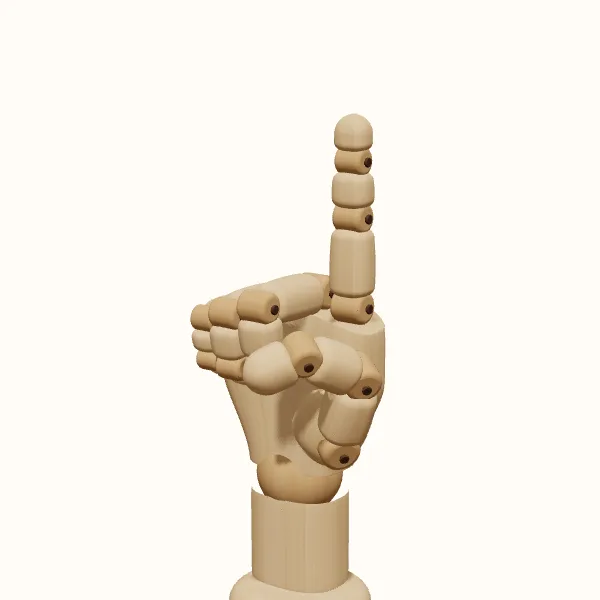
Rotate the view, adjust the fingers, then export your reference.
Start with the preset above. Your edits stay in the tool; the study images below show the original pose.
Pointing hand: three models to study
Compare the simplified wooden form with the female and male hand models. Choose a model to use it in the editor without resetting your finger adjustments.
Establish the direction before the details
Draw a simple directional line from the wrist through the hand and toward the index fingertip. It does not have to be perfectly straight; its purpose is to organize the gesture. Place the palm mass around that direction, then add the index finger as a chain of connected segments. Tracing the finger outline first can leave it disconnected from the direction of the hand.
Rotate the pointing hand reference and compare the direction of the index finger with the wrist. A small wrist bend changes the relationship between the hand and the unseen forearm. In an illustration, decide whether the arm supports a direct instruction, a casual indication, or a reaching gesture. The hand can supply a clear local direction, but the larger pose still needs to carry the action.
Keep the folded fingers connected
The middle, ring, and little fingers usually form a compact group beneath or behind the extended index finger in this starting pose. Block them as a shared volume before separating their individual bends. Their visible edges depend on the camera angle: a side view may show mostly one outer finger, while a palm-side angle can reveal more of the curl. Avoid forcing all three fingertips into view.
Use the pointing hand reference to inspect the gap below the index finger. That negative space helps distinguish a point from a closed fist, especially at small sizes. If the curled fingers are too loose, the pose may read as a partly open hand; if they crowd the index finger, the silhouette can become unclear. Adjust the group while repeatedly checking the final viewing angle.
Give the index finger depth and rhythm
An extended finger is not a uniform tube. Look for changes in width and direction at the joints, and compare the fingertip with the broader base. Keep the joint changes subtle unless the pose specifically needs a bend. Avoid an overly long, straight index finger attached to an undersized hand. Check the finger against the palm before refining the tip or nail.
A pointing hand reference becomes particularly useful when the finger aims toward the viewer. The length compresses, the fingertip overlaps the segments behind it, and the palm may be partly hidden. Do not restore the full side-view length because the shortened shape feels unfamiliar. Rotate between a side view and the target view to understand the overlap, then draw what the target view actually shows.
Use the thumb and wrist to tune expression
A thumb resting close to the curled fingers gives the hand a compact contour. Moving it farther out creates a larger side opening and may change how the gesture is read. Trace the thumb from its base on the palm, not as an isolated mark beside the index finger. Check whether it hides part of a curled finger or creates a distracting tangent against another contour.
For a character pointing to an item, aim the fingertip toward the intended destination in your composition after exporting. For a direct-to-camera gesture, prioritize the overlap and silhouette rather than simply enlarging the finger. The pointing hand reference gives you an adjustable 3D construction, not a finished arm pose or a photographic expression study. Compare with observation when the exact tension or personality of the gesture matters.
Draw the pointing hand step by step
Choose the pointing direction
Open the pose, select left or right, and rotate the hand toward its intended destination in the drawing. Check the fingertip direction against your composition. Start with a side or three-quarter view if you need to understand the construction before attempting stronger foreshortening.
Refine the extended index finger
Adjust the index joints to create the required line without making the finger unnecessarily rigid. Compare its apparent length with the palm. If the finger points toward the camera, inspect the overlap instead of trying to preserve the proportions of a side view.
Organize the supporting fingers
Curl the other fingers into a connected mass, then position the thumb to clarify the closure. Rotate briefly to inspect hidden intersections. Return to the export angle and check that the negative space beneath the index finger still makes the gesture readable.
Export and connect the arm
Export a transparent PNG of your selected view and use it beside the sketch. Construct the wrist and forearm connection in the larger drawing. Save the pointing hand reference pose if you expect to revisit the camera angle or adjust the gesture later.
Pointing hand reference questions
Why does my pointing finger look too long?
The palm may be undersized, the finger may have too little taper, or you may be using side-view proportions in a foreshortened drawing. Compare the index finger with the palm in the pointing hand reference at the same viewing angle before changing isolated details.
Can I make the hand point directly at the camera?
Yes. Rotate the hand until the index fingertip faces the viewer, then inspect the shortened finger and the shapes it hides. A small change in angle can reveal enough of a side plane to make the pose easier to read without abandoning the intended direction.
Should the other fingers always be tightly curled?
No. The curled starting pose is one option. Looser fingers can create a more casual gesture, provided the index finger still carries the main direction. Adjust the fingers individually and check the silhouette, rather than opening all three by the same amount.
Can I use the reference for a left-handed character?
Yes. Switch to the left hand, then recheck the thumb position and the camera angle for your composition. Export the current view when it reads clearly. The pointing hand reference can also be saved or shared so the same arrangement remains available for another drawing.
Make this reference your own
Change the angle and finger pose to fit your sketch, then export a PNG.