3D drawing reference
Peace Sign Reference
Explore this peace sign reference in 3D to study the V-shaped fingers, thumb placement, and hidden overlaps.
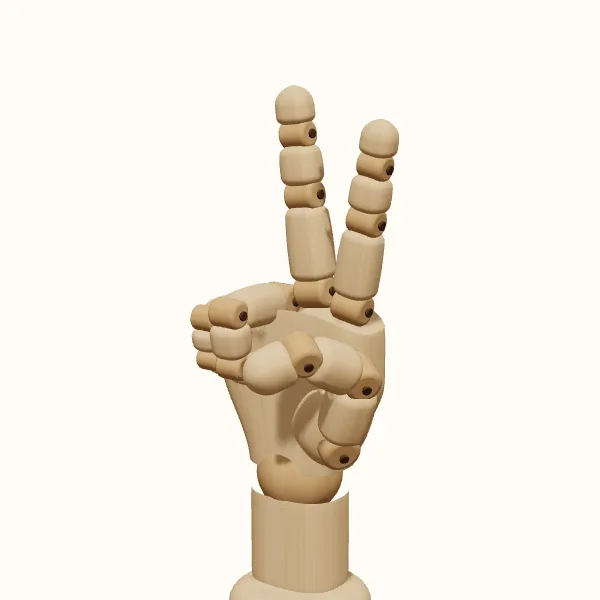
Rotate the view, adjust the fingers, then export your reference.
Start with the preset above. Your edits stay in the tool; the study images below show the original pose.
Peace sign: three models to study
Compare the simplified wooden form with the female and male hand models. Choose a model to use it in the editor without resetting your finger adjustments.
Place the raised fingers and compare the gap
Block in the palm, then locate the bases of the index and middle fingers. Follow each finger outward as a chain of segments rather than drawing one uninterrupted taper. Their tips do not have to sit at the same height in the image. Relative length, joint bends, and camera angle all contribute to the outline. Sketch those relationships lightly before committing to a clean outer contour.
The gap between the raised fingers is an important construction shape. Compare its width near the bases with its width near the tips, and notice whether both fingers stay equally visible. A narrow camera angle can make the gap look smaller even when the pose has not changed. Rotate the model to understand that spacing, then draw the opening as it actually appears from your selected viewpoint.
Trace the curled fingers beneath the raised pair
The folded finger group deserves as much attention as the raised pair. The ring and little fingers curl toward the palm, while the thumb sits across or beside that folded group depending on your adjustments. Trace each curled finger from its knuckle to the part that remains visible. You may see only a short section or a fingertip, but that small shape still needs a clear connection.
Do not draw the base as a complete fist and simply add two extra fingers on top. The extended fingers already belong to the hand and occupy specific positions along the knuckle line. Keep those attachment points in place while constructing the folded fingers beside them. If an overlap becomes confusing, inspect the opposite side of the model before deciding which contour belongs in the final drawing.
Choose a view that reveals the folded fingers
A palm-facing peace sign reference can make the thumb's relationship to the folded fingers easier to inspect. A back-facing view emphasizes the raised fingers' bases and the back of the hand. A three-quarter view gives you depth but may hide one curled finger behind another. Decide which information your illustration needs, then choose the camera angle that presents it without requiring every part of the hand to be visible.
Palm orientation is also part of the depicted gesture, not an interchangeable cosmetic detail. This page does not assign a universal meaning to either facing. For drawing purposes, check the orientation deliberately and keep it consistent with the surrounding scene. Switching the hand side changes the thumb's placement, while rotating the camera changes what you can see; use those controls separately rather than assuming one operation does both jobs.
Simplify lines without losing the finger shapes
A clear V-sign study needs only a few well-placed lines. Preserve the gap between the raised fingers, the thumb's direction, and a clear edge for the folded finger group. Avoid drawing the raised digits as identical parallel tubes or surrounding every joint with a dark ring. Use the selected view to decide where a change of contour is enough to suggest a bend.
Compare the wooden, female, and male models to choose the presentation that supports your drawing. Wooden forms can make an initial volume study simpler, while the other models offer different surface appearances. They remain stylized drawing aids rather than anatomical guarantees. The gallery gives you a shared starting view across the three models; the editor supplies rotation and joint control when you need to investigate the pose further.
Draw the peace sign step by step
Set side and facing
Open the peace sign reference and choose left or right. Set the palm or back orientation, then block in the palm, wrist, and intended forearm direction.
Place the raised pair
Mark the raised finger bases and segment directions. Compare the tips and the space between them; adjust the joints while keeping both fingers distinct.
Explain the folded fingers
Follow the ring and little fingers into their curls, then place the thumb. Rotate to understand overlaps, but draw only the edges visible from your angle.
Keep a reusable study
Export the current view as a transparent PNG and save or share the pose settings. Rotate and export separately for additional angles; no multi-view bundle is included.
Peace sign reference questions
Which fingers form the V shape?
The index and middle fingers form the raised pair in this peace sign reference. The ring finger and little finger remain curled toward the palm, with the thumb arranged near that folded group. Check all five digits when constructing the hand, even if some are partly hidden.
Can I change the spacing between the raised fingers?
You can adjust the finger joints to customize the preset. Check the result from your chosen camera angle, because rotation also changes the visible gap. Make small adjustments and inspect the finger bases as well as the tips before using the pose in a drawing.
Is the palm-facing version always the right choice?
There is no single camera orientation for every illustration. Choose the facing that fits the action of your figure. A palm view shows more of the thumb crossing the folded fingers; a back view emphasizes their attachment points. Try both before deciding which communicates the construction more clearly.
Does this include a two-hand pose?
No. The editor shows one hand at a time, with left and right options. You can make separate studies for a composition containing two hands, but the preset does not provide a linked two-hand scene or automatically position a second hand for you.
Make this reference your own
Change the angle and finger pose to fit your sketch, then export a PNG.