3D drawing reference
Open Hand Reference
Explore this open hand reference from every side, adjust the finger spread, and export the angle your sketch needs.
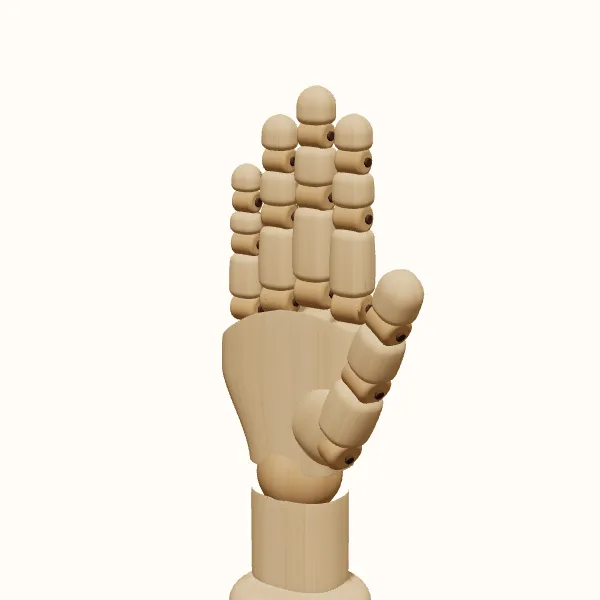
Rotate the view, adjust the fingers, then export your reference.
Start with the preset above. Your edits stay in the tool; the study images below show the original pose.
Open hand: three models to study
Compare the simplified wooden form with the female and male hand models. Choose a model to use it in the editor without resetting your finger adjustments.
Find the palm before drawing the fingers
Block the palm as a broad, slightly tapering mass. Establish where it meets the wrist, then mark the line where the fingers begin. This gives you a stable base for judging finger length. Starting with separate outlines can produce overly long fingers attached at unrelated heights. Think of the fingers as extensions of one organized structure, not decorations around a flat shape.
In an open hand reference, the thumb is especially useful for understanding the palm orientation. Its base creates a larger side mass, and its direction is different from that of the four fingers. Check how much of that base is visible from your selected angle. A palm-facing view and a back-facing view can have similar outer contours while showing very different interior landmarks.
Use negative spaces to check the spread
Look at the gaps between the fingers as shapes in their own right. They may be narrow wedges near the palm and wider openings near the tips. Compare their directions and widths instead of spreading every finger by the same amount. The gap beside the thumb is structurally different from the small spaces between neighboring fingers, so it should not be treated as just another repeated triangle.
An open hand reference helps you test the silhouette before adding detail. Temporarily ignore surface shading and follow the outer edge around every fingertip. If the pose looks like an evenly spaced fan, reduce the repetition by changing individual bends and spacing. Subtle adjustments can help: soften the little finger or bend the index slightly.
Compare palm, back, and edge views
The palm view gives you a broad central area framed by the fingers and thumb. The back view emphasizes the relationship between the finger bases and the wrist. An edge view compresses the palm and stacks the fingers, making their depth and overlap more important than their spread. Rotate gradually between these views and notice when a visible gap closes because one finger moves behind another.
Use the open hand reference at the angle your composition actually needs. A front-facing hand can communicate a clear greeting or stopping gesture, while a three-quarter view often feels more integrated into a character scene. A palm tilted upward may suggest offering or receiving, but the rest of the arm and the surrounding context also contribute. Do not expect an isolated hand to communicate every part of an action.
Avoid a stiff or flattened result
Fully visible fingers tempt artists to straighten every segment and align every joint. That can make the hand feel like a cutout. Study the small direction changes along each finger, and keep the wrist connection broad enough to support the palm. From an angled view, use overlap to show that the fingers occupy different positions in depth rather than drawing all five on the same flat plane.
Switch models to see how surface treatment changes your reading of the pose. The wooden model makes segment boundaries easier to isolate; the female and male models provide alternative surfaces for the same arrangement. This open hand reference is a construction aid, not a substitute for observing a particular person. Use a photograph or your own hand when you need distinctive proportions, skin creases, or a specific natural resting position.
Draw the open hand step by step
Select the hand and camera direction
Open the pose, choose left or right, and rotate to the palm or back view that suits your drawing. Establish the camera direction early. Finger gaps that look clear from the front may disappear once the hand turns to a three-quarter view.
Shape the finger spread
Adjust the fingers individually, watching the spaces between them. Keep the overall gesture clear without forcing equal spacing. Check the fingertip rhythm and the thumb opening together, since both contribute to whether the hand feels calm, formal, or emphatic.
Soften the joints and wrist
Add small bends where the pose looks unnecessarily rigid. Adjust the wrist to fit the direction of the forearm in your sketch. Rotate to an edge view to inspect finger overlap, then return to the intended export angle before judging the silhouette.
Export and draw the large shapes
Export the current view as a transparent PNG. Begin your drawing with the palm, the collective finger shape, and the thumb wedge. Use the open hand reference to check negative spaces only after those main proportions are working together.
Open hand reference questions
Is an open hand the same as a flat hand?
Not necessarily. An open hand can have gently bent fingers and a curved overall form while still leaving the palm visible. A very flat pose is one variation. Adjust the joints and check an edge view if you want the hand to feel less like a rigid plane.
How can I draw the fingers at the right lengths?
Compare each finger with the palm and with its neighbors before detailing individual joints. Use the open hand reference from your chosen camera angle rather than copying proportions from a front view into a tilted one. Foreshortening can make a longer finger appear shorter in the image.
Can I use this reference for a waving hand?
Yes, it can be a starting pose. Set the finger spread and wrist direction to suit the gesture, then draw the arm separately. A single still hand gives you the shape of one moment; motion cues and the wider character pose help communicate the wave.
Can I get both palm and back images?
Yes. Export one view, rotate the 3D hand, and export the other. Each PNG represents the current camera view. Save the pose if you want to keep the same finger arrangement while making additional views of your open hand reference later.
Make this reference your own
Change the angle and finger pose to fit your sketch, then export a PNG.