3D drawing reference
Relaxed Hand Reference
Study the gentle finger curves in this relaxed hand reference, then adjust the wrist and viewing angle for your sketch.
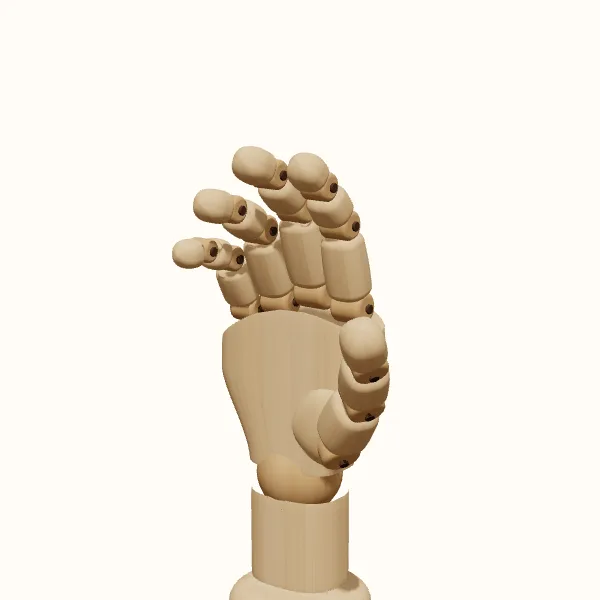
Rotate the view, adjust the fingers, then export your reference.
Start with the preset above. Your edits stay in the tool; the study images below show the original pose.
Relaxed hand: three models to study
Compare the simplified wooden form with the female and male hand models. Choose a model to use it in the editor without resetting your finger adjustments.
Recognize the soft curl of a resting hand
Look for a gentle progression through the fingers rather than a rigid, flat spread. Each finger can keep a slightly different bend, and the fingertips need not form a straight line. Start by finding the broad shape of the palm and the direction in which the fingers fall. That overall direction matters more at first than individual creases or the exact contour of a nail.
An open hand generally emphasizes an extended palm and more extended fingers. A relaxed hand reference instead lets the fingers remain softly curved and closer together. The difference is not simply closing the gaps in an open-hand drawing: the finger segments also change direction. Keep a small amount of variation between them so the pose does not look like a flat board with four parallel extensions.
Follow the rhythm of knuckles and fingertips
Look across the knuckles, then across the fingertips, to find two different rhythms. The finger bases establish where each digit begins, while the curled tips describe the silhouette you see from your chosen angle. A fingertip may appear higher or closer to the palm because of both its length and its bend. Draw the underlying segments lightly before deciding that an unusual outline is an error.
The thumb should participate in the relaxed shape without copying the fingers. Notice how its base adds width to one side of the palm and how its tip points in a different direction. A thumb that is pulled too far away can make the gesture feel deliberately spread. One pressed tightly against the palm may make it feel guarded. Use subtle adjustments and compare the whole silhouette after each change.
Compare finger depth and overlap from different views
From the back, compare the knuckle rhythm; the fingertips may disappear behind the fingers' upper segments. A palm view reveals more of the inward curve. A side view compresses the finger spacing and helps you see how much the fingertips turn toward the palm. These are different observations of one pose, not separate gestures that need unrelated construction.
Choose a three-quarter view when you want both the palm's thickness and a readable finger silhouette. Rotate the 3D hand to inspect the hidden side, then bring it back to your drawing angle. Do not copy every detail from every view into the final picture: only the forms visible from that camera belong there. The extra views are for understanding depth, overlap, and which finger creates each part of the outline.
Vary the finger curls to avoid a flat silhouette
Avoid smoothing all the fingers into a single mitten shape. You can simplify, but retain a few changes of direction that explain the individual digits. The opposite mistake is adding sharp corners everywhere, making a resting hand look tense. Start with a few broad curves and add a firmer joint change only where you can actually see it in the selected view.
The wrist and the eventual arm also influence whether the hand feels at rest. A softly curled hand can still appear awkward if it connects to an arm at an unexplained angle. Adjust the wrist in the editor while keeping your intended forearm direction in mind. Compare wooden, female, and male models when helpful. For a particular person's proportions or skin folds, compare with a photo or your own hand.
Draw the relaxed hand step by step
Choose the resting direction
Open the relaxed hand reference and choose the hand side. Set the camera angle, decide where the forearm continues, and sketch the palm and wrist.
Map the loose bends
Mark the finger bases, then refine the curls with the fifteen finger joints. Compare neighboring fingers so the hand remains neither flat nor clenched.
Check gaps and overlaps
Inspect narrow finger gaps and hidden tips by rotating briefly. Return to your chosen view and simplify without losing the distinction between thumb and fingers.
Export the useful view
Choose the model presentation and export a transparent PNG. Save or share the pose settings; use the editor to explore beyond the gallery’s starting angle.
Relaxed hand reference questions
Is a relaxed hand the same as an open palm?
Not here. This relaxed hand reference keeps a soft curl in the fingers instead of presenting them as fully extended. An open-palm reference is more useful when the action depends on a flat or clearly spread hand, such as showing the palm toward the viewer.
Can I use it for a hand hanging by the side?
Yes, it can be a useful starting point. Choose the wrist direction and camera angle to match the arm in your drawing. The tool shows a single hand, so you will need to construct the arm and the rest of the figure separately.
Why do the fingers overlap so much from the side?
A side view compresses the spacing across the palm. Fingers that are distinct from the front can cover one another at that angle. Rotate the model to identify each finger, then preserve the visible overlap rather than forcing every fingertip into view.
Can I make a left-handed version?
Yes. Switch between left and right hands in the editor, then recheck the camera and the thumb's position. You can also change the model and adjust the joints. Save the resulting pose if you want to return to that specific arrangement later.
Make this reference your own
Change the angle and finger pose to fit your sketch, then export a PNG.