3D drawing reference
Hand Gripping Reference
Use this hand gripping reference to study fingers wrapping around an imagined handle, then pose and export your own view.
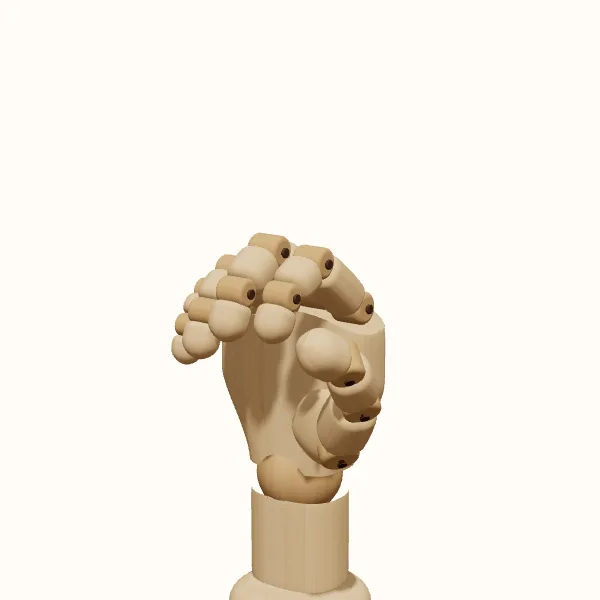
Rotate the view, adjust the fingers, then export your reference.
Start with the preset above. Your edits stay in the tool; the study images below show the original pose.
Gripping hand: three models to study
Compare the simplified wooden form with the female and male hand models. Choose a model to use it in the editor without resetting your finger adjustments.
Establish the invisible cylinder first
Before adjusting individual fingers, decide the direction and approximate thickness of the object in your drawing. Sketch a simple cylinder through the hand area. Its axis tells you how the grip should turn, and its width tells you how far the fingers need to curl. A narrow handle allows a more closed shape; a thicker one keeps the fingers farther from the palm. Avoid choosing finger positions independently of this imagined volume.
Inspect the hand gripping reference from both ends of that axis. The curled fingers should suggest a shared opening, not four unrelated loops. Because the object is absent from the editor, you are responsible for checking the remaining space. A pose that looks convincing from one side may have a fingertip crossing the place where your cylinder belongs when viewed from another direction.
Wrap fingers without copying one curve
Each finger reaches the object from a different position on the palm and has a different length. Begin with the central fingers to establish the main wrap, then adjust the index and little finger to fit the silhouette. Look for a sequence of bends rather than a single smooth hook. The first segment leaves the palm, the next turns around the volume, and the fingertip finishes the curl where it remains visible.
A hand gripping reference is especially useful for seeing which finger segments disappear. Do not draw hidden fingertips. From some angles, one finger covers part of the next, and the imagined object would hide additional areas. Distinguish the full construction from the visible edges that belong in the finished drawing.
Use the thumb to clarify the hold
The thumb gives the grip an opposing direction. Trace it from the broad base beside the palm toward the point where it would meet the object or the neighboring finger. Its position can make the same finger arrangement read as a light hold or a more enclosed grip. Avoid placing the thumb as a small extra hook attached to the wrist; give its base enough volume to connect naturally with the palm.
When studying a hand gripping reference for a character, compare the thumb overlap with the intended action. A hand loosely carrying a handle should not automatically use the same compressed silhouette as a hand gripping a rail. The model can help you arrange the visible forms, but it does not simulate pressure, friction, or load. Use observation when the exact contact pattern is important to the image.
Match the grip to the surrounding drawing
A cylindrical starting pose works best when the object has a roughly cylindrical contact area. A book, phone, or small pinch needs a different arrangement, not a resized cylinder. For a mug handle, consider which fingers pass through the opening and which remain outside. For a tool handle, consider its angle relative to the forearm. Draw those object-specific relationships separately rather than assuming the starting pose already solves them.
Choose your final view with the object sketch in mind. If the camera looks along the handle, the fingers may overlap heavily; from the side, the wrap is easier to read. Export the hand gripping reference, place your object construction alongside it, and compare the two. Correct floating contact points and mismatched axes before spending time on texture, fingernails, or small folds.
Draw the gripping hand step by step
Choose the direction of the hold
Open the grip pose and choose the left or right hand. In your sketch, mark the axis of the object to be held. Rotate the hand until the opening formed by the fingers points in the same direction as that construction line.
Adjust the imaginary handle size
Curl or open the finger joints to leave a suitable gap for the intended handle. Check the gap from the side and from an end view. The editor has no prop collision check, so compare the space with your own object construction.
Refine the thumb and support
Move the thumb into a position that explains how the object would be enclosed. Adjust the wrist to match the gesture of the forearm in your drawing. Use small changes and recheck the chosen camera angle after each adjustment.
Combine the reference with your sketch
Export a transparent PNG of the current view. Draw the object separately and work out which edges it hides. Save the hand gripping reference pose so you can rotate it again if an overlap becomes difficult to understand during drawing.
Gripping hand reference questions
Can I add a cup, sword, or other prop to the editor?
No. This pose uses an empty hand arranged around an imagined cylinder. You can adjust the fingers and thumb, then add the object in your drawing software or sketch. The reference does not include a prop loader or automatic contact fitting.
What is the difference between a grip and a fist?
A grip leaves space for an object and organizes the fingers around its shape. A fist closes the fingers toward the palm without that volume between them. Use a hand gripping reference when the object determines the curve, spacing, and visible overlap of the fingers.
Will this work for a hand holding a flat object?
It can provide a starting point, but a flat object usually needs different finger contact and thumb placement. Sketch the object first, then modify the pose to fit its planes. Do not preserve a circular opening if the object in your drawing is thin and rectangular.
How do I stop the object from looking like it floats?
Align the object axis with the finger wrap, remove gaps at intended contact points, and check which edges should be hidden. The hand gripping reference helps with construction, but the final contact is something you establish in your drawing, including any appropriate contact shadows.
Make this reference your own
Change the angle and finger pose to fit your sketch, then export a PNG.