3D drawing reference
Claw Hand Reference
Shape this claw hand reference into an expressive human-hand gesture, with curled fingers and an open palm.
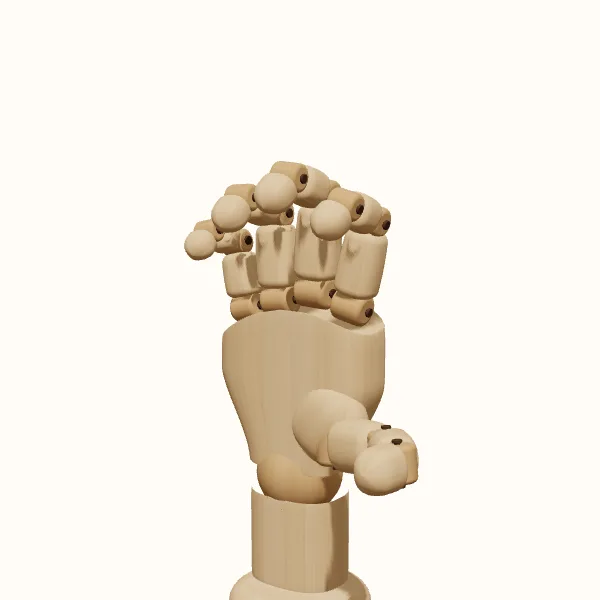
Rotate the view, adjust the fingers, then export your reference.
Start with the preset above. Your edits stay in the tool; the study images below show the original pose.
Claw hand: three models to study
Compare the simplified wooden form with the female and male hand models. Choose a model to use it in the editor without resetting your finger adjustments.
Block the palm before curving the fingers
Block in the palm as one solid mass. Place the knuckle line before drawing individual fingers, then trace each finger as a short chain of connected segments. Curving the fingers does not mean bending every segment by the same amount. A stronger bend near the middle can bring a fingertip toward the palm while leaving the first segment more open. Look for these changes rather than drawing four identical hooks.
The thumb needs its own direction. It approaches the fingers from the side of the palm, helping describe the empty space between them. Imagine a loose ball inside that space without adding an actual prop. A wide thumb opening suggests a broader grasp; a closer thumb makes the shape more compact. Keep the fingertip silhouettes distinct enough that the viewer can still understand the gesture.
Check fingertip depth from several angles
From the palm side, a claw hand reference exposes the spaces between the fingers and the overall shape of the grip. This view is useful for studying how the fingertips point inward. From the back, the knuckle rhythm and the fingers' changing directions become more prominent. Neither view needs to show every finger fully. Some overlap is useful, as long as you can explain which finger sits in front.
Rotate toward a three-quarter view when a straight-on silhouette becomes difficult to read. This gives the palm visible depth and lets you compare a nearer finger with a farther one. A side view emphasizes the arc from knuckle to fingertip but can hide the other fingers almost completely. Use the rotatable model to inspect that hidden structure, then return to the view you actually intend to draw.
Vary wrist angle and fingertip spacing
The same curved hand can support several fictional actions with small changes to its shape. For a tentative reach, leave more space between the fingertip arcs and avoid making every bend equally sharp. For a more tense pose, bring the fingers closer together and compare their inward directions. The effect also depends on the wrist: the same finger arrangement can read differently when the palm tilts toward or away from the viewer.
Keep the larger character action in mind while making those changes. A hand floating alone can look expressive, yet fail to match the arm that will connect to it in a drawing. Establish the direction of the forearm outside the reference and use the wrist as the transition. PoseMaker lets you adjust the wrist and finger joints, but it does not decide the character's emotion or replace the surrounding figure construction.
Stagger the finger bends and knuckle positions
A common drawing problem is turning the fingers into four evenly spaced question marks. Compare finger lengths, the staggered knuckle positions, and the amount of each fingertip that remains visible. Small differences give the hand a clearer internal structure. Another problem is outlining the whole shape before checking the palm. If the palm is too narrow, the fingers may look attached to a point rather than supported by a hand.
Use the wooden model to simplify the forms, then compare the female and male models for a different surface presentation. The gallery provides a starting view across the three models; it is not a downloadable collection of every camera angle. For a new composition, open the 3D editor, choose your view, and inspect the overlaps there. Treat all three as practical drawing aids rather than a claim of exact anatomical measurement.
Draw the claw hand step by step
Establish the palm
Open the claw hand reference and choose left or right. Rotate until the palm and wrist direction read clearly, then block in those two masses.
Separate the finger arcs
Follow each finger from base to tip. Adjust individual joints rather than giving every finger the same curve, and check the spaces between them.
Test the silhouette
Turn slightly to either side to identify the overlapping fingertips. Return to your drawing angle and resolve unclear contours before adding surface details.
Keep the chosen study
Export your selected view as a transparent PNG. Save or share the pose to revisit its settings; choose and export other camera views separately.
Claw hand reference questions
Is this an animal claw reference?
No. This claw hand reference shows a curved human hand. It is intended for human or human-like character drawing, where the fingers curl around open space. It does not provide animal paw structure, talons, fur, or species-specific anatomy.
How is this different from a fist?
In this pose, the curled fingers remain open enough to describe space in front of the palm. A fist is a more closed arrangement. You can tighten the curl, but check the thumb and fingertip overlaps again as the shape changes.
Can I make the gesture less aggressive?
Yes. Curled fingers do not have to look aggressive. Try reducing the bends, opening the thumb, or changing the wrist angle. The surrounding arm, face, and action in your drawing will also influence how the hand is interpreted.
Can I add an object to the hand?
This tool provides a single hand, not an object-placement scene. You can pose the fingers around an imagined volume and draw your own object separately. Use the empty spaces as construction guides, without treating the preview as a verified contact or grip simulation.
Make this reference your own
Change the angle and finger pose to fit your sketch, then export a PNG.