3D drawing reference
Fist Drawing Reference
Rotate this fist reference, inspect the curled fingers and thumb, and adjust the 3D hand for your drawing.
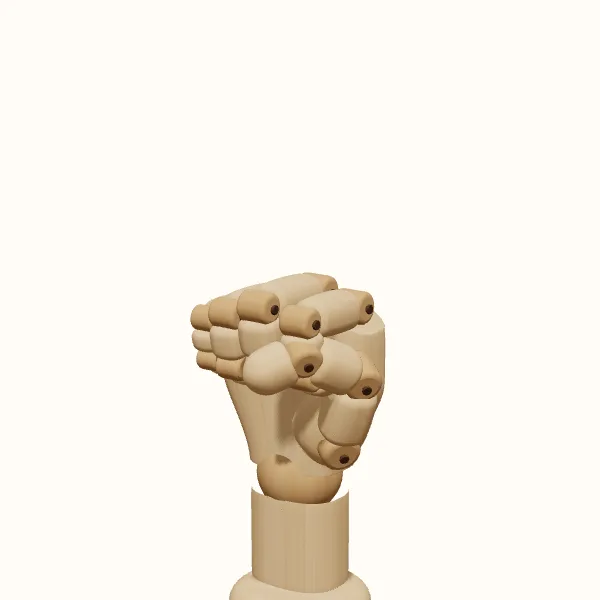
Rotate the view, adjust the fingers, then export your reference.
Start with the preset above. Your edits stay in the tool; the study images below show the original pose.
Fist: three models to study
Compare the simplified wooden form with the female and male hand models. Choose a model to use it in the editor without resetting your finger adjustments.
Build the fist from connected masses
Start with the palm as a short box rather than tracing each visible finger. Add the curled fingers as a second mass folded against it. From the back of the hand, the knuckles form an uneven ridge; they should not look like identical beads arranged on a ruler. The middle finger often establishes the strongest landmark, while the outer edge turns toward the little finger. Treat these landmarks as a connected rhythm across the fist.
Use the fist reference to compare the width of the finger mass with the palm. A common drawing mistake is to attach a narrow strip of fingers to an oversized hand, which makes the pose look like a mitten. At the opposite extreme, four equally large knuckles can overwhelm the palm. Block both masses together and check their relationship before adding smaller joints or creases.
Let the thumb explain the closure
In this pose, the thumb rests across the outside of the curled fingers. Its base belongs to a substantial wedge on the side of the palm, not to the wrist itself. Follow that wedge into the first thumb segment, then look for the change of direction toward the tip. The thumb can cover part of the index finger and hide the space beneath it, so its placement determines which contours remain visible.
A useful fist reference makes those overlaps easier to inspect. Turn to a thumb-side view and notice where one shape ends behind another. Avoid drawing a continuous dark line around every finger; that can flatten the folded structure into separate tubes. Establish the outside silhouette first, then use a few interior lines to clarify contact and depth. Leave out detail that the viewing angle does not actually reveal.
Choose an angle that fits the drawing
A back view emphasizes the knuckle ridge and the broad plane leading toward the wrist. A palm-side view reveals more of the curled fingers and the thumb crossing them. In a three-quarter view, these areas overlap, giving you a clearer sense of volume. When aimed toward the viewer, the knuckles dominate while the palm and wrist appear shorter.
For a comic panel, choose the camera direction before refining the gesture. A sideways fist reference may become unclear head-on. For a character resting a hand at their side, reduce the sense of compression and consider a softer wrist angle. For a raised fist, check the wrist connection in the wider drawing. The isolated hand does not establish the shoulder, elbow, or direction of the entire arm.
Separate useful structure from surface detail
Switch between the wooden, female, and male models to compare how the same pose reads with different surfaces. The wooden hand is useful for identifying the individual segments. The other models offer a different silhouette and shading reference, but none should be treated as a complete anatomical explanation. If your drawing needs a specific person, age, skin fold, or highly realistic compression, compare the pose with an appropriate photograph or direct observation.
Before exporting, inspect the fist reference from the side as well as your chosen drawing angle. Look for fingers passing through neighboring fingers, a thumb floating away from its contact point, or a wrist bend that distracts from the gesture. Believable overlap and a clear silhouette matter more than adding every crease.
Draw the fist step by step
Set the hand and view
Open the fist pose, choose the left or right hand, and select a model. Rotate to the direction needed for your drawing. Decide whether the knuckle ridge, thumb side, or curled fingertips should carry the image before making detailed adjustments.
Refine the finger closure
Adjust the finger joints in small increments. Compare the index and little finger rather than giving every finger exactly the same bend. Rotate briefly to the side to check that the folded segments read as connected forms and do not visibly intersect.
Place the thumb and wrist
Bring the thumb into a readable position across the outside of the fingers. Adjust the wrist to support the direction of the gesture. Return to the original camera angle after each change, because a good side view does not guarantee a clear final silhouette.
Export a construction reference
Export a transparent PNG of the current view and place it beside your sketch. Draw the palm mass, finger mass, and thumb wedge first. Save or share the pose if you want to return later and create another view of the same fist reference.
Fist reference questions
How do I draw a fist without making it look square?
Vary the contour around the knuckles, narrow the hand toward the wrist, and give the thumb its own directional change. Use the fist reference to identify the largest plane changes. Do not rely on small creases to rescue a silhouette that is still a rigid rectangle.
Can I use this for a fist pointing toward the viewer?
Yes. Rotate the hand so the knuckles face the camera, then check the overlap of the fingers and thumb. Use that view for foreshortening practice. You will still need to construct the forearm and the rest of the character separately to make the full action convincing.
Can I change a closed fist into a looser gesture?
Yes. Reduce the finger curl and adjust the thumb so the closure feels less compressed. Check the gaps from more than one angle. A relaxed hand can retain the overall fist shape while showing small separations that would disappear in a tighter pose.
Does the export include every viewing angle?
The PNG captures the current view, not a multi-angle image pack. Rotate the 3D fist reference and export again for another angle. Saving the pose lets you revisit the same finger arrangement instead of rebuilding it for each drawing.
Make this reference your own
Change the angle and finger pose to fit your sketch, then export a PNG.