Twist, Arms OpenPose Reference
Camera angles
Twist, Arms Open keeps the hips square while the chest rotates one way with arms spread at shoulder height and the head turns back the other way.
Tags: standingfigure drawingfull bodyarms outtwist
How to draw the Twist, Arms Open pose
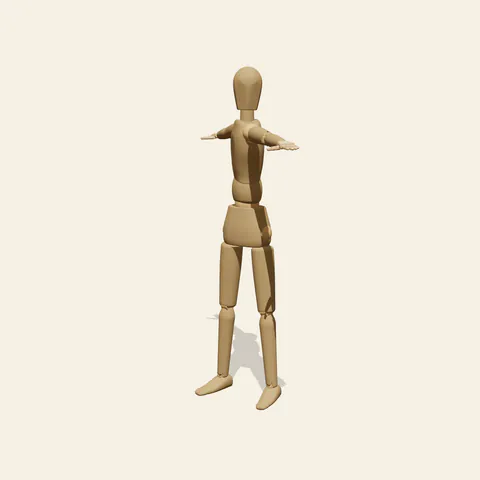
three-quarter view 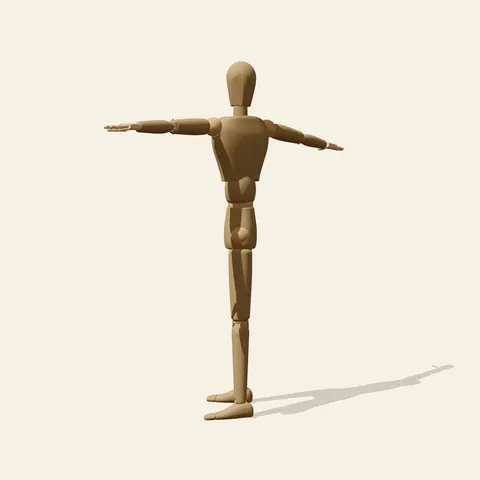
side view 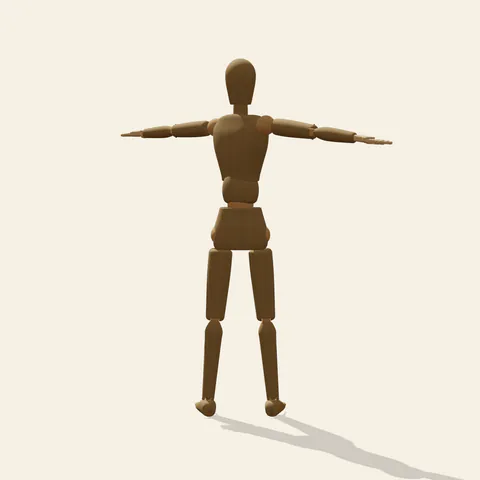
back view 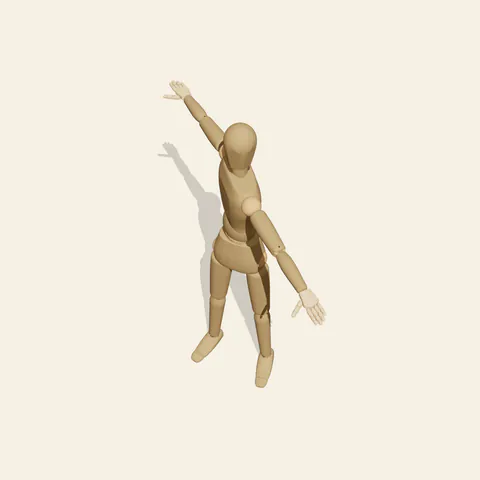
high-angle view
Below the waist nothing moves: feet a little apart, toes slightly out, legs straight and the pelvis facing forward. Above it the ribcage swivels to the figure's right by a wide margin, which carries the left arm forward and the right arm back while both stay straight and level at shoulder height, hands open. The neck then rotates strongly in the opposite direction so the face turns past centre toward the figure's left, sighting along the forward arm. Hips, chest and head each point somewhere different, and that stacked rotation is the entire subject of the standing twist.
The front view is deceptive: the arms look like a plain T and only the narrowed chest and the profile-turned head hint at the rotation. The three-quarter view, from the front-left, shows the forward arm foreshortened toward the camera and the shoulders nearly edge-on. In the side view, from the figure's left, both arms seem to grow out of a chest that faces you more than the hips do. The high angle is the clearest diagram, because you can compare the line of the shoulders with the line of the hips like two hands of a clock. The back view shows the rear arm reaching away behind the far shoulder.
More on angles and common mistakes
The common error is turning the whole body as one block, which gives a figure standing at an angle instead of a twisted one. Keep the navel pointing at the viewer and let the sternum turn. Another slip is letting the forward arm drift down or bend; both arms should sit at the same height as if resting on a long pole. Also avoid turning the head with the chest, which removes the counter-rotation. On a person the oblique muscles would wrap diagonally around the waist, while the mannequin shows only a smooth joint.
Use it for warm-up stretches, a character pointing two ways while giving directions, martial-arts forms, dance transitions and contrapposto exercises for students. In Edit this pose, rotate the chest further while keeping the head fixed, then watch the high angle to judge how far the spine can go before the pose looks strained. Mirror it to twist the other way.
Free to use (CC0). The pose images on this page are released under CC0 1.0 (public domain dedication). Use them for drawing practice, commercial illustration, reference sheets or AI image generation; no attribution is required. A credit to PoseMaker is appreciated but optional.
Twist, Arms Open pose prompt
Copy a prompt for your AI image generator. Pair it with the OpenPose skeleton in ControlNet so the generated character matches this exact pose.
General prompt
A person stands with feet slightly apart and hips facing forward while the chest twists to one side. Both arms stretch straight out at shoulder height, one swinging forward and one back, with open hands. The head turns the opposite way from the chest, looking along the forward arm. Plain background.
Midjourney
full body person standing, feet slightly apart, hips square, chest twisted to one side, both arms stretched straight out at shoulder height, one forward and one back, open hands, head turned the opposite way, looking along the front arm, plain background --ar 2:3 --style raw
Stable Diffusion
1person, full body, standing, torso twist, twisting, spine rotation, arms out, outstretched arms, arms at shoulder height, open hands, head turned, looking to the side, hips forward, straight legs, feet apart, from above, plain background
Negative prompt
whole body turned, hips twisted, t-pose facing forward, arms raised overhead, arms lowered, bent elbows, head facing chest direction, leaning sideways, extra arms, extra fingers, bad anatomy, cropped hands, cropped feet
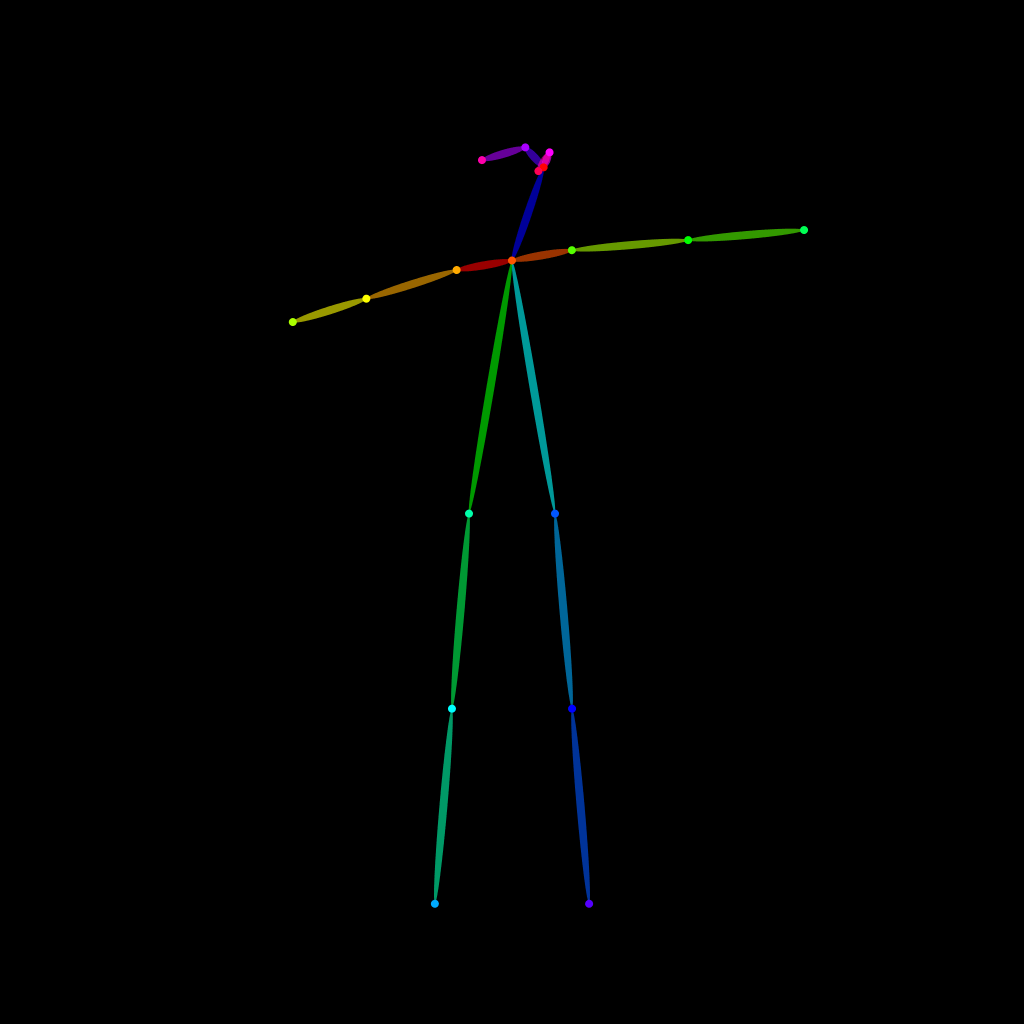
OpenPose skeleton for ControlNet
Load the PNG into a ControlNet OpenPose unit (preprocessor: none), or import the JSON into an OpenPose editor.
Have a photo of the pose you want?
Upload it to Photo to Pose. We detect the pose in your browser and put it on the mannequin, ready to adjust.