Finger FramePose Reference
Camera angles
Finger Frame turns both hands into L shapes held ahead of the face, the left hand at eye level and the right at the top of the chest, elbows out.
Tags: upper bodyhand gesturefinger framephotography
How to draw the Finger Frame pose
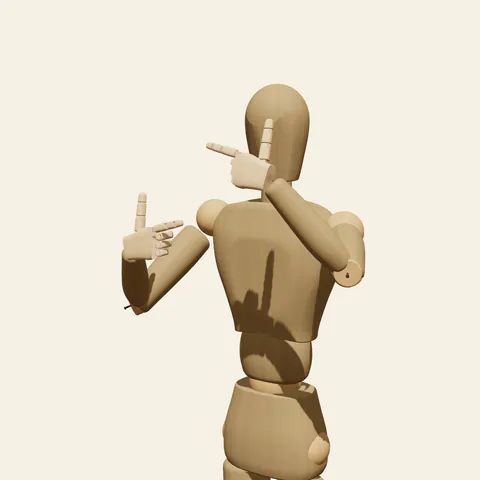
three-quarter view 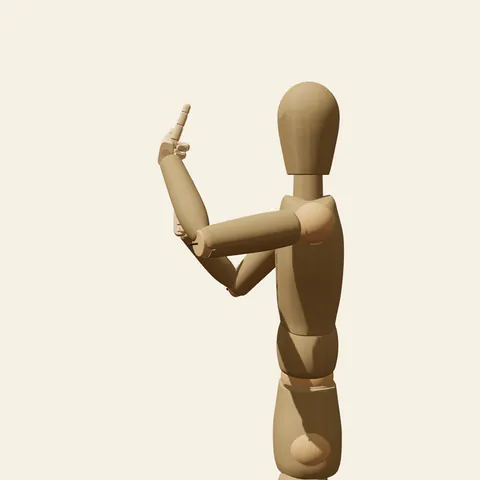
side view 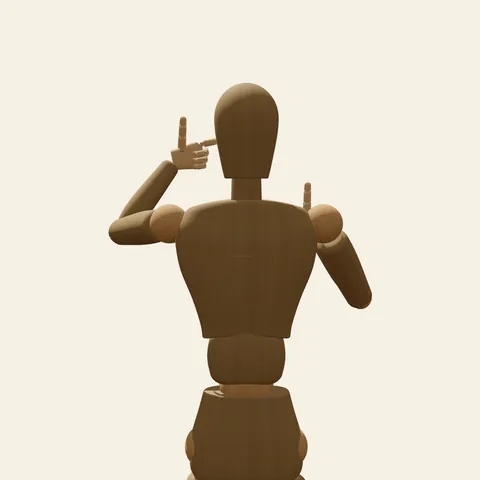
back view 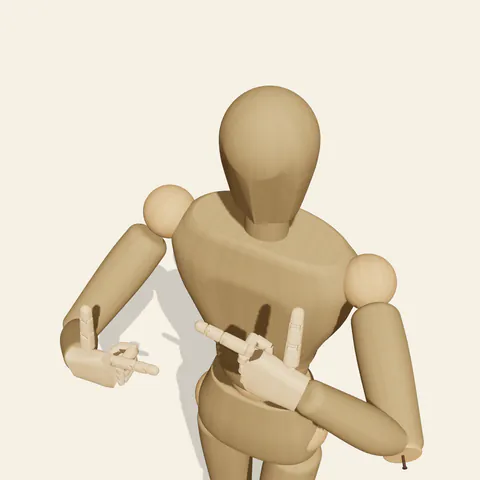
high-angle view
Each hand makes the same L: the index finger is straight, horizontal and points across toward the centre line, the thumb stands straight up at a right angle to it, and the middle, ring and little fingers curl tightly into the palm. The palms face the body, so the viewer sees the backs of the hands and a short row of folded knuckles under each index finger. The left hand sits higher, level with the eyes, and the right hand sits lower, at the top of the chest; the hands never touch, and together the two corners mark opposite ends of an imaginary picture. Both upper arms lift away from the ribs with the elbows pointing out to the sides, and the forearms angle forward so the hands hover about 20 to 25 cm ahead of the face. The head stays level, eyes looking through the gap between the hands. Out of frame, the legs keep a loose stance with the weight on the right leg.
Draw each L hand as a flattened box with two sticks attached: one leaving the top edge (thumb), one leaving the side edge (index). Keep both hands at about the same distance in front of the face, otherwise the frame falls apart in profile. The front view shows the upper L beside the eyes and the lower L just under the jaw on the opposite side, with open space between them. The three-quarter view from the figure's front-left reveals how far the hands sit forward and how the elbows flare. The side view from the left lines the hands up one above the other well ahead of the nose. From the high angle the two forearms read as diagonals pointing toward the face.
More on angles and common mistakes
Typical mistakes: index fingers aimed at the viewer instead of across, bent thumbs that blur the L, shrugged shoulders, and one hand pressed to the face while the other floats far forward.
A finger frame pose is a natural fit for photographers, film directors, travel bloggers and anyone saying "picture this" while planning a shot. In Edit this pose, rotate the right hand so its thumb points down instead of up; the two Ls then close into the classic rectangular viewfinder, while both hands stay the same distance from the face.
Free to use (CC0). The pose images on this page are released under CC0 1.0 (public domain dedication). Use them for drawing practice, commercial illustration, reference sheets or AI image generation; no attribution is required. A credit to PoseMaker is appreciated but optional.
Finger Frame pose prompt
Copy a prompt for your AI image generator. Pair it with the OpenPose skeleton in ControlNet so the generated character matches this exact pose.
General prompt
A waist-up view of a person making a finger frame: both hands form an L, index finger pointing toward the middle and thumb up; left hand at eye level, right hand at the top of the chest, hands apart in front of the face, palms toward the body, elbows out. Head level, looking through the frame, plain background.
Midjourney
upper body portrait, person making a camera frame with both hands, two L shapes of thumb and index finger, one hand at eye level and one at upper chest, hands apart in front of face, elbows out, looking through the frame, plain background --ar 4:5 --style raw
Stable Diffusion
1person, upper body, finger frame, framing hands, l-shaped hands, thumb up, index finger extended, curled fingers, elbows out, hands in front of face, looking at viewer, looking through fingers, front view, waist-up shot, plain background, simple background, five fingers
Negative prompt
hands at different depths, bent thumbs, index pointing at viewer, open palms, peace sign, shrugged shoulders, hands touching face, wrong finger count, fused fingers, extra hands, full body, nsfw, deformed hands, blurry
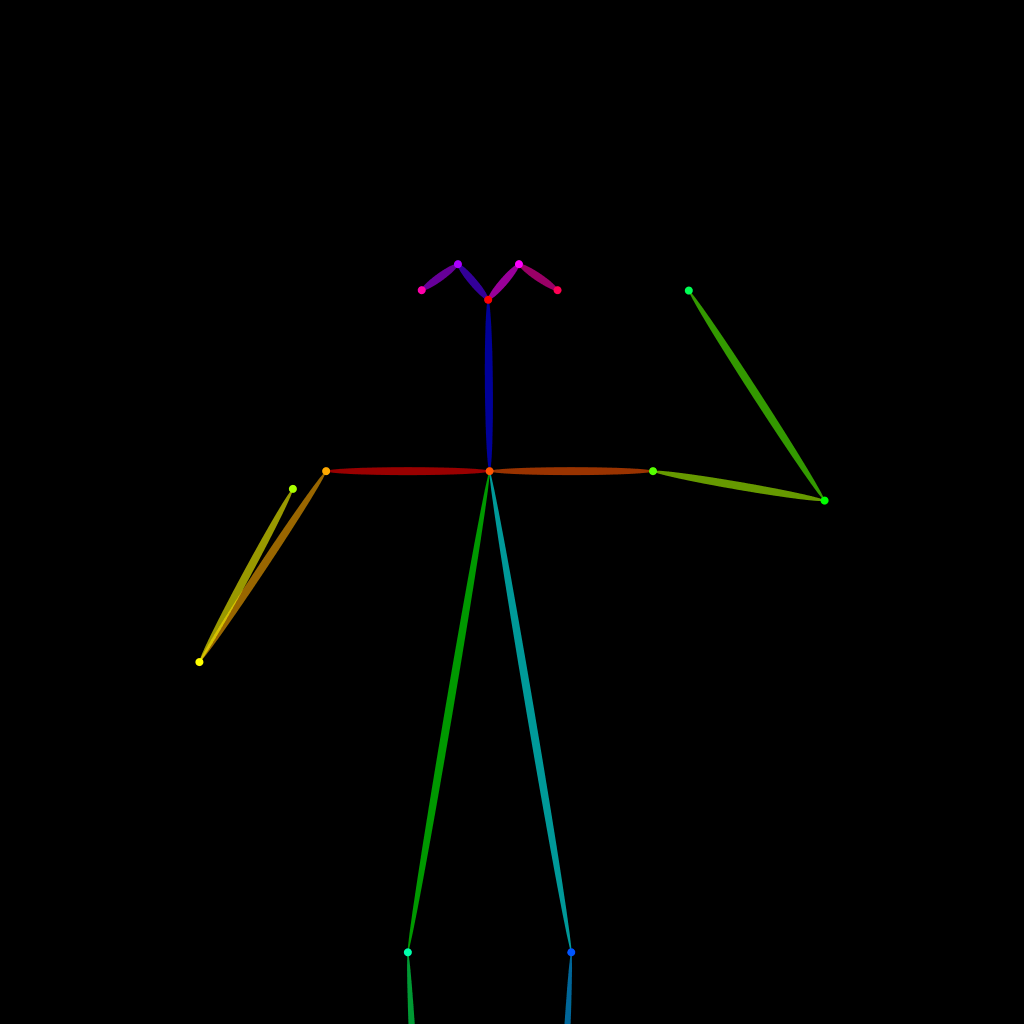
OpenPose skeleton for ControlNet
Load the PNG into a ControlNet OpenPose unit (preprocessor: none), or import the JSON into an OpenPose editor.
Have a photo of the pose you want?
Upload it to Photo to Pose. We detect the pose in your browser and put it on the mannequin, ready to adjust.